如何使用 GitHub Actions 和 Prisma Postgres 预配预览数据库
概述
本指南将向您展示如何使用 GitHub Actions 和 Prisma Postgres 管理 API 自动创建和删除 Prisma Postgres 数据库。此设置将为每个拉取请求预配一个新数据库,用示例数据填充它,并且 github-actions 机器人会留下一个包含数据库名称和状态的评论。
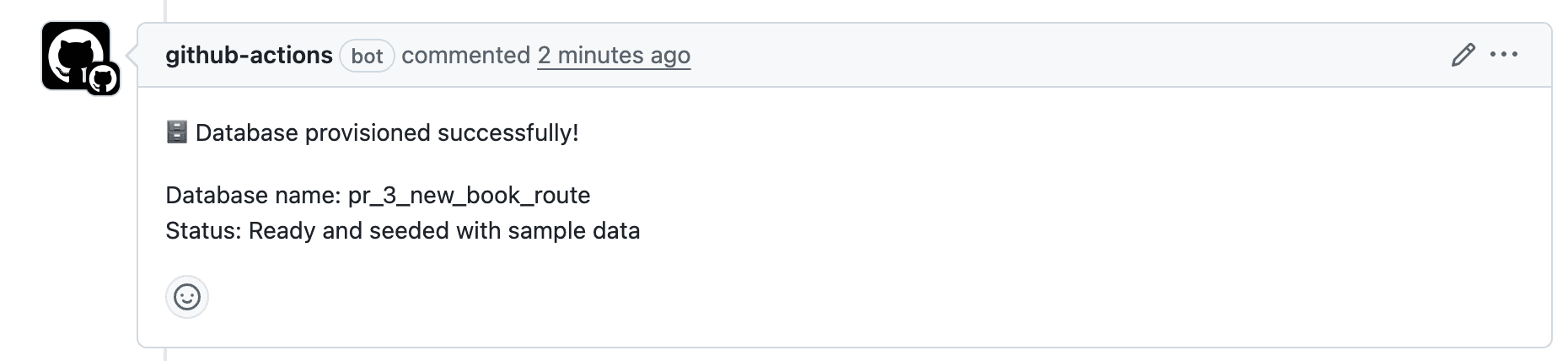
PR 关闭后,数据库将自动删除。这允许您在隔离环境中测试更改,而不会影响主开发数据库。
先决条件
请确保您具备以下条件
- Node.js 20 或更高版本
- 一、帐户
- GitHub 存储库
1. 设置项目
初始化您的项目
mkdir prisma-gha-demo && cd prisma-gha-demo
npm init -y
2. 安装和配置 Prisma
在本节中,您将在项目中设置 Prisma,并在将其集成到 GitHub Actions 之前验证其在本地的运行情况。这包括安装 Prisma 的依赖项,连接到 Prisma Postgres 数据库,定义数据模型,应用架构,以及使用示例数据填充数据库。
到本节结束时,您的项目将完全准备好在本地和 CI 工作流中使用 Prisma。
2.1. 安装依赖项
要开始使用 Prisma,请安装所需的依赖项
npm install prisma tsx @types/pg dotenv --save-dev
npm install @prisma/client @prisma/adapter-pg pg
如果你使用的是其他数据库提供程序(MySQL、SQL Server、SQLite),请安装相应的驱动程序适配器包,而不是 @prisma/adapter-pg。有关更多信息,请参阅 数据库驱动程序。
安装后,初始化 Prisma
npx prisma init --db --output ../src/generated/prisma
这将创建
- 一个包含
schema.prisma的prisma/目录 - 一个包含
DATABASE_URL的.env文件 - 一个在
src/generated/prisma中生成的客户端
2.2. 定义您的 Prisma 架构
编辑 prisma/schema.prisma 以
generator client {
  provider = "prisma-client"
  output   = "../src/generated/prisma"
}

datasource db {
  provider = "postgresql"
}

model User {
  id    Int     @id @default(autoincrement())
  email String  @unique
  name  String?
  posts Post[]
}

model Post {
  id        Int     @id @default(autoincrement())
  title     String
  content   String?
  published Boolean @default(false)
  authorId  Int
  author    User    @relation(fields: [authorId], references: [id])
}
创建一个 prisma.config.ts 文件来配置 Prisma 进行填充
import 'dotenv/config'
import { defineConfig, env } from 'prisma/config';

export default defineConfig({
  schema: 'prisma/schema.prisma',
  migrations: {
    path: 'prisma/migrations',
    seed: `tsx src/seed.ts`,
  },
  datasource: {
    url: env('DATABASE_URL'),
  },
});
您需要安装 dotenv 包
npm install dotenv
2.3. 运行初始迁移并生成客户端
npx prisma migrate dev --name init
然后生成 Prisma Client
npx prisma generate
这将推送您的架构并准备好客户端。
2.4. 填充数据库
在 src/seed.ts 创建一个文件
import { PrismaClient } from "../src/generated/prisma/client";
import { PrismaPg } from "@prisma/adapter-pg";
import "dotenv/config";

const adapter = new PrismaPg({
  connectionString: process.env.DATABASE_URL!,
});

const prisma = new PrismaClient({
  adapter,
});

const userData = [
  {
    name: "Alice",
    email: "alice@prisma.io",
    posts: {
      create: [
        {
          title: "Join the Prisma Discord",
          content: "https://pris.ly/discord",
          published: true,
        },
        {
          title: "Prisma on YouTube",
          content: "https://pris.ly/youtube",
        },
      ],
    },
  },
  {
    name: "Bob",
    email: "bob@prisma.io",
    posts: {
      create: [
        {
          title: "Follow Prisma on Twitter",
          content: "https://twitter.com/prisma",
          published: true,
        },
      ],
    },
  },
];

export async function main() {
  for (const u of userData) {
    await prisma.user.create({ data: u });
  }
}

main()
  .catch(console.error)
  .finally(() => prisma.$disconnect());
更新您的 package.json
{
  {
  "name": "prisma-gha-demo",
  "version": "1.0.0",
  "description": "",
  "scripts": {
    "seed": "tsx src/seed.ts"
  },
  // other configurations...
}
然后运行
npm run seed
npx prisma studio
导航到 https://:5555 并验证数据库是否已填充示例数据。现在您已准备好使用 GitHub Actions 自动化此过程。
3. 添加 GitHub Actions 工作流
在此步骤中,您将设置一个 GitHub Actions 工作流,该工作流在新拉取请求 (PR) 打开时自动预配 Prisma Postgres 数据库。一旦 PR 关闭,工作流将清理数据库。
3.1 创建工作流文件
首先创建所需的目录和文件
mkdir -p .github/workflows
touch .github/workflows/prisma-postgres-management.yml
此文件将包含按 PR 管理数据库的逻辑。此 GitHub Actions 工作流将
- 在 PR 打开时预配一个临时 Prisma Postgres 数据库
- 使用测试数据填充数据库
- 在 PR 关闭时清理数据库
- 支持预配和清理的手动执行
此工作流使用 us-east-1 作为 Prisma Postgres 的默认区域。您可以通过修改 API 调用中的 region 参数,甚至通过向工作流添加 region 输入来将其更改为首选区域。
3.2. 添加基本配置
将以下内容粘贴到 .github/workflows/prisma-postgres-management.yml 中。这将设置工作流何时运行并提供所需的环境变量。
name: Prisma Postgres Management API Workflow

on:
  pull_request:
    types: [opened, reopened, closed]
  workflow_dispatch:
    inputs:
      action:
        description: "Action to perform"
        required: true
        default: "provision"
        type: choice
        options:
          - provision
          - cleanup
      database_name:
        description: "Database name (for testing, will be sanitized)"
        required: false
        type: string

env:
  PRISMA_POSTGRES_SERVICE_TOKEN: ${{ secrets.PRISMA_POSTGRES_SERVICE_TOKEN }}
  PRISMA_PROJECT_ID: ${{ secrets.PRISMA_PROJECT_ID }}
  # Sanitize database name once at workflow level
  DB_NAME: ${{ github.event.pull_request.number != null && format('pr-{0}-{1}', github.event.pull_request.number, github.event.pull_request.head.ref) || (inputs.database_name != '' && inputs.database_name || format('test-{0}', github.run_number)) }}

# Prevent concurrent runs of the same PR
concurrency:
  group: ${{ github.workflow }}-${{ github.ref }}
  cancel-in-progress: true
现在您将向此工作流添加预配和清理作业。这些作业将根据拉取请求事件处理 Prisma Postgres 数据库的创建和删除。
3.3. 向工作流添加预配作业
现在添加一个作业,用于在 PR 打开或手动触发时预配数据库。此预配作业将
- 安装依赖项
- 检查现有数据库
- 如果需要,创建一个新数据库
- 填充数据库
- 在 PR 上评论状态
在工作流文件中的 jobs: 键下追加以下内容
jobs:
  provision-database:
    if: (github.event_name == 'pull_request' && github.event.action != 'closed') || (github.event_name == 'workflow_dispatch' && inputs.action == 'provision')
    runs-on: ubuntu-latest
    permissions: write-all
    timeout-minutes: 15
    steps:
      - name: Checkout
        uses: actions/checkout@v4

      - name: Setup Node.js
        uses: actions/setup-node@v4
        with:
          node-version: "22"
          cache: "npm"

      - name: Install Dependencies
        run: npm install

      - name: Validate Environment Variables
        run: |
          if [ -z "${{ env.PRISMA_POSTGRES_SERVICE_TOKEN }}" ]; then
            echo "Error: PRISMA_POSTGRES_SERVICE_TOKEN secret is not set"
            exit 1
          fi
          if [ -z "${{ env.PRISMA_PROJECT_ID }}" ]; then
            echo "Error: PRISMA_PROJECT_ID secret is not set"
            exit 1
          fi

      - name: Sanitize Database Name
        run: |
          # Sanitize the database name to match Prisma's requirements
          DB_NAME="$(echo "${{ env.DB_NAME }}" | tr '/' '_' | tr '-' '_' | tr '[:upper:]' '[:lower:]')"
          echo "DB_NAME=$DB_NAME" >> $GITHUB_ENV

      - name: Check If Database Exists
        id: check-db
        run: |
          echo "Fetching all databases..."
          RESPONSE=$(curl -s -X GET \
            -H "Authorization: Bearer ${{ env.PRISMA_POSTGRES_SERVICE_TOKEN }}" \
            -H "Content-Type: application/json" \
            "https://api.prisma.io/v1/projects/${{ env.PRISMA_PROJECT_ID }}/databases")

          echo "Looking for database with name: ${{ env.DB_NAME }}"

          # Extract database ID using jq to properly parse JSON
          DB_EXISTS=$(echo "$RESPONSE" | jq -r ".data[]? | select(.name == \"${{ env.DB_NAME }}\") | .id")

          if [ ! -z "$DB_EXISTS" ] && [ "$DB_EXISTS" != "null" ]; then
            echo "Database ${{ env.DB_NAME }} exists with ID: $DB_EXISTS."
            echo "exists=true" >> $GITHUB_OUTPUT
            echo "db-id=$DB_EXISTS" >> $GITHUB_OUTPUT
          else
            echo "No existing database found with name ${{ env.DB_NAME }}"
            echo "exists=false" >> $GITHUB_OUTPUT
          fi

      - name: Create Database
        id: create-db
        if: steps.check-db.outputs.exists != 'true'
        run: |
          echo "Creating database ${{ env.DB_NAME }}..."
          RESPONSE=$(curl -s -X POST \
            -H "Authorization: Bearer ${{ env.PRISMA_POSTGRES_SERVICE_TOKEN }}" \
            -H "Content-Type: application/json" \
            -d "{\"name\": \"${{ env.DB_NAME }}\", \"region\": \"us-east-1\"}" \
            "https://api.prisma.io/v1/projects/${{ env.PRISMA_PROJECT_ID }}/databases")

          # Check if response contains an id (success case)
          if echo "$RESPONSE" | grep -q '"id":'; then
            echo "Database created successfully"
            CONNECTION_STRING=$(echo "$RESPONSE" | jq -r '.data.connectionString')
            echo "connection-string=$CONNECTION_STRING" >> $GITHUB_OUTPUT
          else
            echo "Failed to create database"
            echo "$RESPONSE"
            exit 1
          fi

      - name: Get Connection String for Existing Database
        id: get-connection
        if: steps.check-db.outputs.exists == 'true'
        run: |
          echo "Creating new connection string for existing database..."
          CONNECTION_RESPONSE=$(curl -s -X POST \
            -H "Authorization: Bearer ${{ env.PRISMA_POSTGRES_SERVICE_TOKEN }}" \
            -H "Content-Type: application/json" \
            -d '{"name":"read_write_key"}' \
            "https://api.prisma.io/v1/databases/${{ steps.check-db.outputs.db-id }}/connections")

          CONNECTION_STRING=$(echo "$CONNECTION_RESPONSE" | jq -r '.data.connectionString')
          echo "connection-string=$CONNECTION_STRING" >> $GITHUB_OUTPUT

      - name: Setup Database Schema
        run: |
          # Get connection string from appropriate step
          if [ "${{ steps.check-db.outputs.exists }}" = "true" ]; then
            CONNECTION_STRING="${{ steps.get-connection.outputs.connection-string }}"
          else
            CONNECTION_STRING="${{ steps.create-db.outputs.connection-string }}"
          fi

          # Set the DATABASE_URL
          export DATABASE_URL="$CONNECTION_STRING"

          # Generate Prisma Client
          npx prisma generate

          # Push schema to database
          npx prisma db push

      - name: Seed Database
        run: |
          # Get connection string from appropriate step
          if [ "${{ steps.check-db.outputs.exists }}" = "true" ]; then
            CONNECTION_STRING="${{ steps.get-connection.outputs.connection-string }}"
          else
            CONNECTION_STRING="${{ steps.create-db.outputs.connection-string }}"
          fi

          # Set the DATABASE_URL environment variable for the seed script
          export DATABASE_URL="$CONNECTION_STRING"

          # Generate Prisma Client
          npx prisma generate

          # Run the seed script
          npm run seed

      - name: Comment PR
        if: success() && github.event_name == 'pull_request'
        uses: actions/github-script@v7
        with:
          github-token: ${{ secrets.GITHUB_TOKEN }}
          script: |
            github.rest.issues.createComment({
              issue_number: context.issue.number,
              owner: context.repo.owner,
              repo: context.repo.repo,
              body: `🗄️ Database provisioned successfully!\n\nDatabase name: ${{ env.DB_NAME }}\nStatus: Ready and seeded with sample data`
            })

      - name: Output Database Info
        if: success() && github.event_name == 'workflow_dispatch'
        run: |
          echo "🗄️ Database provisioned successfully!"
          echo "Database name: ${{ env.DB_NAME }}"
          echo "Status: Ready and seeded with sample data"
3.4. 向工作流添加清理作业
当拉取请求关闭时,您可以通过添加清理作业自动删除关联的数据库。此清理作业将
- 按名称查找数据库
- 从 Prisma Postgres 项目中删除它
- 也可以使用
action: cleanup手动触发
将以下内容追加到您的 jobs: 部分,位于 provision-database 作业之后
  cleanup-database:
    if: (github.event_name == 'pull_request' && github.event.action == 'closed') || (github.event_name == 'workflow_dispatch' && inputs.action == 'cleanup')
    runs-on: ubuntu-latest
    timeout-minutes: 5
    steps:
      - name: Checkout
        uses: actions/checkout@v4

      - name: Validate Environment Variables
        run: |
          if [ -z "${{ env.PRISMA_POSTGRES_SERVICE_TOKEN }}" ]; then
            echo "Error: PRISMA_POSTGRES_SERVICE_TOKEN secret is not set"
            exit 1
          fi
          if [ -z "${{ env.PRISMA_PROJECT_ID }}" ]; then
            echo "Error: PRISMA_PROJECT_ID secret is not set"
            exit 1
          fi

      - name: Sanitize Database Name
        run: |
          # Sanitize the database name
          DB_NAME="$(echo "${{ env.DB_NAME }}" | tr '/' '_' | tr '-' '_' | tr '[:upper:]' '[:lower:]')"
          echo "DB_NAME=$DB_NAME" >> $GITHUB_ENV

      - name: Delete Database
        run: |
          echo "Fetching all databases..."
          RESPONSE=$(curl -s -X GET \
            -H "Authorization: Bearer ${{ env.PRISMA_POSTGRES_SERVICE_TOKEN }}" \
            -H "Content-Type: application/json" \
            "https://api.prisma.io/v1/projects/${{ env.PRISMA_PROJECT_ID }}/databases")

          echo "Looking for database with name: ${{ env.DB_NAME }}"

          # Extract database ID using jq to properly parse JSON
          DB_EXISTS=$(echo "$RESPONSE" | jq -r ".data[]? | select(.name == \"${{ env.DB_NAME }}\") | .id")

          if [ ! -z "$DB_EXISTS" ] && [ "$DB_EXISTS" != "null" ]; then
            echo "Database ${{ env.DB_NAME }} exists with ID: $DB_EXISTS. Deleting..."
            DELETE_RESPONSE=$(curl -s -X DELETE \
              -H "Authorization: Bearer ${{ env.PRISMA_POSTGRES_SERVICE_TOKEN }}" \
              -H "Content-Type: application/json" \
              "https://api.prisma.io/v1/databases/$DB_EXISTS")

            echo "Delete API Response: $DELETE_RESPONSE"

            if echo "$DELETE_RESPONSE" | grep -q '"error":'; then
              ERROR_MSG=$(echo "$DELETE_RESPONSE" | jq -r '.message // "Unknown error"')
              echo "Failed to delete database: $ERROR_MSG"
              exit 1
            else
              echo "Database deletion initiated successfully"
            fi
          else
            echo "No existing database found with name ${{ env.DB_NAME }}"
          fi
这完成了您的 Prisma Postgres 管理工作流设置。在下一步中,您将配置所需的 GitHub 密钥以向 Prisma API 进行身份验证。
4. 将代码存储在 GitHub 中
初始化一个 git 存储库并推送到 GitHub
如果您在 GitHub 中还没有存储库,请在 GitHub 上创建一个。一旦存储库准备就绪,运行以下命令
git add .
git commit -m "Initial commit with Prisma Postgres integration"
git branch -M main
git remote add origin https://github.com/<your-username>/<repository-name>.git
git push -u origin main
将 <your-username> 和 <repository-name> 替换为您的 GitHub 用户名和存储库名称。
5. 检索工作流的密钥
5.1. 检索您的 Prisma Postgres 服务令牌
要管理 Prisma Postgres 数据库,您还需要一个服务令牌。请按照以下步骤检索它
- 确保您位于上一步中创建项目的同一工作区。
- 导航到您工作区的 Settings 页面并选择 Service Tokens。
- 点击 New Service Token。
- 复制生成的令牌并将其保存到您的
.env文件中,作为PRISMA_POSTGRES_SERVICE_TOKEN。此令牌是下一步脚本所需的,并且必须添加到您的 GitHub Actions 密钥中。
5.2 检索您要预配 Prisma Postgres 数据库的项目 ID
为避免与您的开发数据库冲突,您现在将专门为 CI 工作流创建一个专用项目。使用以下 curl 命令通过 Prisma Postgres Management API 创建一个新的 Prisma Postgres 项目
curl -X POST https://api.prisma.io/v1/projects \
  -H "Authorization: Bearer $PRISMA_POSTGRES_SERVICE_TOKEN" \
  -H "Content-Type: application/json" \
  -d "{\"region\": \"us-east-1\", \"name\": \"$PROJECT_NAME\"}"
确保将 $PRISMA_POSTGRES_SERVICE_TOKEN 变量替换为之前存储的服务令牌。
将 $PRISMA_POSTGRES_SERVICE_TOKEN 替换为服务令牌,将 $PROJECT_NAME 替换为您的项目名称(例如,my-gha-preview)。脚本将在 us-east-1 区域创建一个新的 Prisma Postgres 项目。
CLI 输出将如下所示
{
  "data": {
    "id": "$PRISMA_PROJECT_ID",
    "type": "project",
    "name": "$PROJECT_NAME",
    "createdAt": "2025-07-15T08:35:10.546Z",
    "workspace": {
      "id": "$PRISMA_WORKSPACE_ID",
      "name": "$PRISMA_WORKSPACE_NAME"
    }
  }
}
复制并存储输出中的 $PRISMA_PROJECT_ID。这是您的 Prisma 项目 ID,您将在下一步中使用它。
6. 在 GitHub 中添加密钥
要添加密钥
- 转到您的 GitHub 存储库。
- 导航到 Settings。
- 点击并展开 Secrets and variables 部分。
- 点击 Actions。
- 点击 New repository secret。
- 添加以下内容
PRISMA_PROJECT_ID- 您在 Prisma 控制台中的 Prisma 项目 ID。PRISMA_POSTGRES_SERVICE_TOKEN- 您的服务令牌。
这些密钥将通过 env 在工作流文件中访问。
7. 尝试工作流
您可以通过两种方式测试设置
选项 1:通过 PR 自动触发
- 在存储库上打开一个拉取请求。
- GitHub Actions 将预配一个新的 Prisma Postgres 数据库。
- 它将推送您的架构并填充数据库。
- 将向 PR 添加一条评论,确认数据库已创建。
- 当 PR 关闭时,数据库将自动删除。
选项 2:手动触发
- 转到存储库中的 Actions 选项卡。
- 在左侧边栏选择 Prisma Postgres Management API Workflow。
- 点击 Run workflow 下拉菜单
- 选择
provision作为操作,并可选择提供自定义数据库名称。您也可以选择cleanup来删除一个*现有*数据库。 - 点击 Run workflow。
后续步骤
您现在拥有一个完全自动化的 GitHub Actions 设置,用于管理临时 Prisma Postgres 数据库。
这将为您提供
- 每个拉取请求的独立数据库。
- 自动架构同步和填充。
- 合并后清理未使用的数据库。
此设置提高了对更改的信心,并降低了共享数据库冲突的风险。您可以通过集成测试套件或将其集成到工作流中来扩展此功能。
与 Prisma 保持联系
通过以下方式与我们保持联系,继续你的 Prisma 之旅: 我们的活跃社区。保持信息灵通,参与其中,并与其他开发人员协作。
- 在 X 上关注我们 获取公告、直播活动和实用技巧。
- 加入我们的 Discord 提问、与社区交流,并通过对话获得积极支持。
- 在 YouTube 上订阅 获取教程、演示和直播。
- 在 GitHub 上参与 加星收藏存储库、报告问题或为问题做出贡献。